Upgrade/ Downgrade packages – card customers
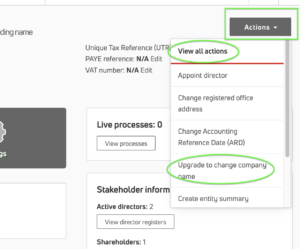
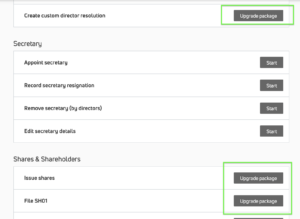
I am a card customer, how do I upgrade my package in Kudocs? This is very easy to do. If you want to use Kudocs to do something that is not in your current package (e.g. you are on the Essential package and want to issue new shares – which is in the Dynamic package), navigate to the Actions list and scroll to the action you want to perform. It will be locked, telling you that you need to upgrade. Click on the button and that’s it. You’ll get an invoice with any pro-rata charges and your package will be upgraded. Couldn’t be easier.
I am a card customer, how do I downgrade my package in Kudocs? Just get in touch with us by chat or email and we’ll take care of it for you. You can’t downgrade automatically as there are certain things we need to check with you first (like what to do with data that you have in Kudocs but may not be available to you on a lower package).
I am a card customer, how do I switch between monthly and annual packages? Just get in touch with us by chat or email and we’ll take care of it for you.
What if I am a portfolio customer – can I upgrade or downgrade? Yes, if you are a portfolio customer if you are a portfolio admin, just click on {Reports & Subscription management} and then scroll down to Subscriptions. Select the entity you want to change and click on {Change package}. You can use this to upgrade and downgrade packages, cancel subscriptions and switch between annual and monthly. Terms apply. See our FAQ here for more information.
Last updated: 24/11/2025 by Kudocs Admin