Record recent transactions that pre-date the last confirmation statement
What is the difference between record recent and record historic?
Record Recent
- Used for actions that have happened since the last confirmation statement or relevant share transaction.
- It updates the current company information in Kudocs.
- Kudocs handles the administrative work: updating registers (e.g., register of members), stakeholder profiles, generating documents (e.g., share certificates), and filing with Companies House where applicable.
- Example: A shareholder currently has 1,000 shares in Kudocs. You record a recent share issue of 500 shares → their total updates to 1,500 shares.
Use Record Recent when the legal/consent steps have already been completed offline, and you need Kudocs to manage the admin and make live changes to the company’s records/ registers.
Record Historic
- Used for actions that happened before the last confirmation statement or relevant share transaction.
- It does not change the current company information or balances.
- Kudocs only adds the event as a historical fact to the relevant registers (e.g., register of members). No Companies House filings, share certificates, or other administrative outputs are generated (as these are assumed to have been handled at the time).
- Example: A shareholder currently has 1,000 shares in Kudocs. You record a historic share issue of 500 shares from the past → their total remains 1,000 shares. The historic transaction is simply noted as a past event.
Record Historic is useful for adding past information or to fill in gaps (e.g., a director who was appointed and resigned years ago, or old share transactions). These entries are treated as standalone/”dumb” records — they don’t need to be in chronological order, don’t have to be complete, and don’t affect current totals.
Quick Comparison
| Aspect | Record Recent | Record Historic |
|---|---|---|
| Timing | Since last confirmation/ relevant share transaction | Before last confirmation/ relevant share transaction |
| Updates live data | Yes | No |
| Purpose | Recent actions that have been legally completed and need to be added to register/ other admin work needed | Adding past events to registers to provide a complete history of a company |
In short: Use Record Recent for new events that should affect today’s records. Use Record Historic to log old events without impacting current company data. For more information see here.
Why do I need to record transactions in chronological order in Kudocs? See here for the relevant information.
Kudocs is not allowing me to record a transaction as recent when the transaction took place before before the last confirmation statement. Why? Certain events in an entity’s life are treated specially by Kudocs – this matches what happens in reality. For example, when an entity files a confirmation statement, it is confirming that all the information filed at Companies House is up to date and correct as at that date. This includes shareholders and shareholdings. When you record a recent transaction in Kudocs, the system will update the shareholder records. If you have filed a confirmation statement, you have confirmed that the information contained therein is correct – so you cannot then record a transaction that pre-dates the confirmation statement, as it renders the confirmation statement incorrect.
For example:
- A company files a confirmation statement on 1 February. It states that A and B each own 100 Ordinary shares.
- The company forgot to add details of a share transfer to Kudocs before filing the confirmation statement. Now it needs to record the share transfer and that it happened on 20 January.
- The details of the transfer are that A transferred 50 shares to B. I.e. their total shareholdings changed to A:50 and B:150 – which is not what was shown in the confirmation statement.
- You cannot do that, as standard, in Kudocs as recording the transfer makes the confirmation statement incorrect.
We recognise that it is sometimes the case that companies forget to record all transactions before they file the confirmation statement. Therefore confirmation statement can be incorrect. We therefore have a way for portfolio users to adjust Kudocs temporarily to allow them to add transactions as recent, even though they pre-date the last confirmation statement. See the answer below for more information.
Kudocs is not allowing me to record a transaction as recent when the transaction took place before before the date of another transaction. Why? Further to the answer above, Kudocs also treats certain transactions as ‘special’ inasmuch as the system does not allow you to record a recent transaction that pre-dates another. There are a number of reasons for this including:
- Kudocs recalculates share balances after each transaction is added to the system to ensure that shareholders, shareholdings, share capital and share certificates (if generated) are always correct as at the date of that transaction. If you try to add share transactions out of order, the calculations may not be correct. Kudocs works a bit like a bank account in this respect – transactions need to be recorded in real time to ensure that the balance after each transaction is correct to allow the subsequent transactions to make sense.
- there may have been a Companies House filing (e.g. SHo1) that has been filed, which would be rendered incorrect if you add a pre-dated transaction.
- there may have been share certificates generated, which which would be rendered incorrect if you add a pre-dated transaction.
If you need to record a transaction that pre-dates another and are being prevented from doing so by Kudocs, please contact us and we can help.
How do I record a transaction that happened before the last confirmation statement, but was not added to Kudocs/ to the company registers and not included in the last confirmation statement? Admin users of Portfolio customers can now make a temporary change to a company account in Kudocs to change the date of the last confirmation statement, to override the system’s in built date validation – to allow you record a ‘recent’ transaction that took place before the last confirmation statement.
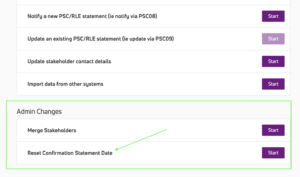
To use this feature, go to Actions > View all Actions > Admin Changes > Reset Confirmation Statement Date. Then just enter the date you want to use.
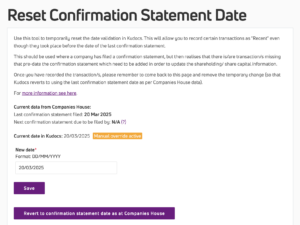
Use this tool to temporarily reset the date validation in Kudocs. This will allow you to record certain transactions as “Recent” even though they took place before the date of the last confirmation statement.
This should be used where a company has filed a confirmation statement, but then realises that there is/are transaction/s missing that pre-date the confirmation statement which need to be added in order to update the shareholding/ share capital information.
For example:
- A company filed a confirmation statement on 12 January 2026.
- They then realise they forgot to record a share transfer that happened on 1 November 2025. By default, Kudocs will make you add this transfer as historic (as it happened before the last confirmation statement), so it will be added to the registers, but it won’t update the share balances to reflect the transfer.
- To allow the company to record the transfer as recent (ie to update the share balances), use the Reset Confirmation Statement Date tool to change the date to something before 1 November 2025 – e.g. 20 October 2025.
- The company can then record the transfer as recent on 1 November 2025. This will update the balances.
- The company then removes the reset, and Kudocs reverts to using the correct confirmation statement date.
Once you have recorded the transaction/s, please remember to:
- Come back to this page and remove the temporary change (so that Kudocs reverts to using the last confirmation statement date as per Companies House data); and
- Review whether you need to file a new confirmation statement or file an RP04 to correct the previous (potentially now incorrect) confirmation statement.
What is the “Reset Confirmation Statement Date” button for? Use this tool to temporarily reset the date validation in Kudocs. This will allow you to record certain transactions as “Recent” even though they took place before the date of the last confirmation statement.
This should be used where a company has filed a confirmation statement, but then realises that there is/are transaction/s missing that pre-date the confirmation statement which need to be added in order to update the shareholding/ share capital information.
See the answers above for more information.
Last updated: 21/07/2026 by Kudocs Admin