Billing details – for card customers
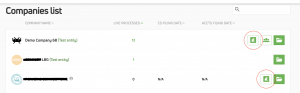
How do I see my company’s billing details? This is easy to do. You can find it either by clicking on the £ icon on your My Companies dashboard:
or via the Billing tab in entity settings:
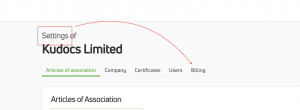
You can only view billing details if you have the necessary user permissions (Admin).
How do I find invoices? Invoices are stored in the billing section of your entity’s account and can be viewed and downloaded from there:
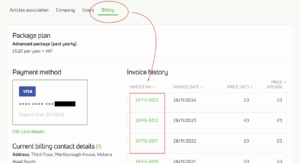
How do I change billing details (card details, contact, etc)?. You can edit all card payment details in the billing section of your entity’s account.
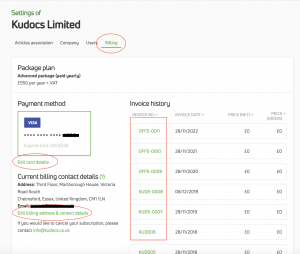
How can I find details of the current subscription for an entity (and it’s subscription history)? Very easily – see here to find out how.
I am getting an error message saying that my payment method has been rejected. Why and how can I fix this? This is an automatic response from our card payment processor (Stripe) that means that payment has tried to be taken (usually for a renewal) and it has been rejected. This is usually because there are insufficient funds on the card, the card has been cancelled, or the issuing bank has stopped the payment.

It is easy to fix this. If you are the account primary admin, you just need to click on the shopping trolley icon, select which package you want (so you can change package from what you had originally) and then enter your (new!) card details. As long as payment can be taken, this will reactivate your account with all the old information, but just with new card details.
Last updated: 07/11/2025 by Kudocs Admin