Portfolio Settings – customisation
How do I edit my portfolio settings? Any Portfolio Admin user can amend the portfolio settings via “Portfolio Actions” > “All Settings.
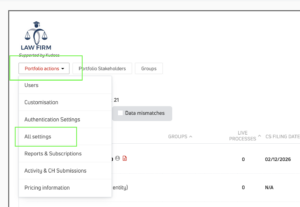
How do I edit the portfolio name, colour scheme, portfolio logo & main contact details? In “Portfolio Actions” > “Customisation” and you will be able to make all the changes you need there. Note that the portfolio logo will be used on the front page of any entity registers you export.


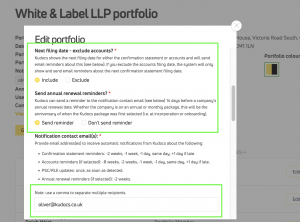
How do I edit what emails we receive about portfolio companies (e.g. accounts and confirmation statement filing reminders) and who receives them (notification emails)? In “Portfolio Actions” > “All Settings” > “Edit Settings” and you will be able to make all the changes you need to the notification contact email address. You can add multiple email addresses to receive these reminders, separated by a comma. This controls who receives the following emails and when:
Portfolio level emails:
- Upcoming filing reminders (sent on 1st day of month)
- Weekly data mismatch alert (sent weekly)
- Upcoming UID filings email
- Confirmation statement reminders: -2 weeks, -1 week, -1 day, same day, +1 day if late.
- Accounts reminders (if selected): -8 weeks, -2 weeks, -1 week, -1 day, same day, +1 day if late.
- PSC/RLE updates: once, as soon as detected.
- Annual renewal reminders (if selected): -2 weeks.
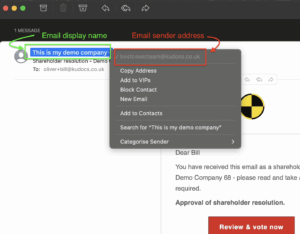
Can I edit the email address and email sender name that Kudocs uses to send emails? Yes. Portfolio customers can edit the part of the email before the @ sign (the email username, local part or prefix) as well as how the email appears in the inbox (the sender name). This allows you to customise both the actual email and how the email appears in an inbox. E.g. “bestcosecteam@kudocs.co.uk” which can also be labelled to appear as “Cosec Team”.
You can see what these settings are in “Portfolio Actions” > “All Settings” > “Edit Settings” and click on “Edit”.

Or, in “Portfolio Actions” > “Customisation” > “Custom emails” where you can change either the email prefix and/or the email display name to whatever you want. You can always review and edit these changes.

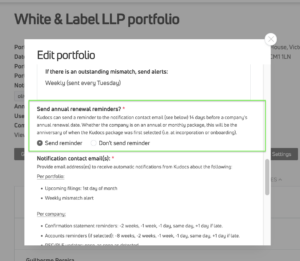
Can I set up Kudocs to send reminders about upcoming subscriptions renewals? Yes. You can do this via “Portfolio Actions” > “All Settings” > “Edit Settings” > “Send annual renewal reminders?”
Kudocs will send a reminder to the notification contact email(s) 14 days before an entity’s annual renewal date. Whether the entity is on an annual or monthly package, this will be the anniversary of when the Kudocs package was first selected (i.e. at incorporation or onboarding).
How does Kudocs determine who to send reminder and update emails about specific processes? Kudocs will send emails to the user who initiated the process with updates on the status of that process – e.g. if the process has been approved, if the process is still pending and getting close to its lapse date, if the Companies House filing has been successful, etc. Kudocs sends the email to the user who started that particular process, rather than all portfolio users (i) for reasons of confidentiality – you may not want all users in your firm knowing about all activity of all your clients; and (ii) to reduce the number of emails sent/ received.
Portfolio users can add default cc email addresses for these emails – i.e. the email will still be sent to the user who initiated the process, but you can cc the rest of your cosec team as standard to keep them in the loop:

How do I customise certain emails that Kudocs sends users? In “Portfolio Actions” > “Customisation” > “Custom emails” and you will be able to make changes there.
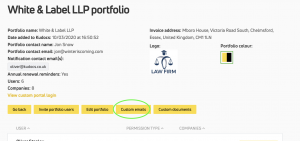
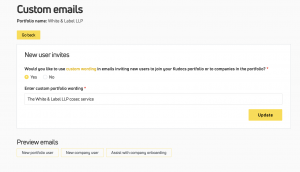
How do I customise share certificates generated by Kudocs? In “Portfolio Actions” > “Customisation” > “Certificates” and you will be able to make changes there. We are always adding new templates for these documents, to let us know if you have a house style that you would like us to add.
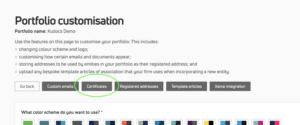

How do I set up and edit default settings for incorporations in my portfolio? We have a number of default settings or templates you can use to make incorporations more easy. See here for more information.
How do I manage Portfolio users (add, edit permission, remove user, etc)? Very easily – we have a separate FAQ answering all of these questions here.
How do I control permitted log in/ authentication methods to access Kudocs (e.g. SSO)? Easily – if you are a portfolio admin you will be able to access “Portfolio Actions” > “Authentication Settings”. From there, you will be able to define what login method(s) are permitted to access your portfolio.


Note: if a user logs in via a method that is not permitted, they will be able to login to Kudocs and see your portfolio name, but they will not be able to access any entity accounts in your portfolio or access any portfolio settings. This is important if you give someone else access to your portfolio, or an entity in your portfolio – they need to log in via a method that you require in order to access the information.
Last updated: 30/06/2026 by Kudocs Admin