Stakeholder communications and votes – emailing stakeholders, electronic voting & vote tracking, email tracking & more
How can Kudocs help me with stakeholder voting and communications?
Kudocs has a range of tool to help you streamline stakeholder decisions, information flows and investor communications – as well as recording everything for future retrieval. These can simplify entity governance and investor relationships – making life easier for companies and advisers.
Read on for more!
Can I use Kudocs to email shareholders (or other stakeholders) with updates about the company?
Yes. If you are on our Advanced or Enterprise package, you can use Kudocs to send customised shareholder updates. It is very quick and easy!
The beauty of the system is that, as long as Kudocs has up-to-date email addresses for all shareholders, it does all the work for you. No need to track down email addresses manually, do a mail merge or worry about missing someone off (or using the cc: instead of bcc: function by mistake!). You can also tailor the content to be sent out and which recipients it is sent to.
Not only that, all updates are stored in Kudocs forever. This makes it easy for you, or any other user, to find and reference them in the future. They can also be retrieved by your shareholders via the shareholder dashboard. In short, Kudocs helps you interact with your shareholders easily and effectively.
For more information on how to run shareholder updates through Kudocs, see our Guide here.
Can I use Kudocs to run electronic voting on resolutions by stakeholders?
Yes. You can use Kudocs to send out shareholder and board written resolutions on a range of matters. This does not just include pre-programmed legal changes (for example, changing directors), but also custom board resolutions and member/shareholder written resolutions. You can even run custom investor consents for internal consents in line with a shareholder’s agreement or articles.
As well as circulating the resolution, Kudocs lets stakeholders electronically cast their vote easily & securely using our platform. Kudocs will count the votes and calculate %s to determine whether each resolution has passed, before creating a pdf with all signatures for you. There is very little for you to do!
You can also add manual votes to resolutions if a particular stakeholder cannot vote electronically. Kudocs will count these in the same way as an electronic vote.
See below for an example of using Kudocs for an ordinary resolution of the members.
For more information on the different processes, see our Guides on custom board resolutions, member resolutions and investor consents. This FAQ will focus on technical points shared by several processes.

Where do I find votes in progress?
You can find these in several places – on your Portfolio or My Companies Dashboard (“Live Processes”), on the company’s dashboard (“Live Processes”) or in the Live & Completed Processes tab for that company. See below for some examples.


How do I track vote responses?
You can see the status of any live vote by opening the process in question (as above) and scrolling down the page to the vote tracker. This will show you details of who has or has not voted and the current voting %. You also have the option to add manual votes (e.g. that a stakeholder has reported to you via another route), and resend emails to those who have not yet voted.
Can I track emails (delivery status and read status) sent by Kudocs?
Yes. Whenever a Kudocs email is sent out as part of a resolution process, we track the status of the email (i.e. sent, delivered, failed, clicked or opened) together with a timestamp of the most recent activity. You can find this tracking data in the entity’s ‘Activity Timeline’ – see the screenshot below. Just hover over the mail icon by the email entry for the tracking details.

Can I resend emails that have been sent already?
Yes, of course! Just open the relevant process and scroll down to the section for stakeholders who have not yet voted. You can then either resend the email to one or more individuals, or resend to all that have not yet responded.

Can I add multiple email recipients for a stakeholder?
Yes – but only the main stakeholder can take any action required in the the email. For more information see our FAQ here about multiple contact email addresses.
Where do emails sent from Kudocs come from? Which sender address is used & how does the sender name display in an inbox?
The email address used to send emails from the Kudocs system is notifications@kudocs.co.uk. This covers user invitations, shareholder votes, emails with shareholder certificates attached, process update emails and Companies House filing notifications etc.
Portfolio (Enterprise) customers can customise the part of the email before the @ sign. For example, this can be changed to “bestcosecteam@kudocs.co.uk” (as below).
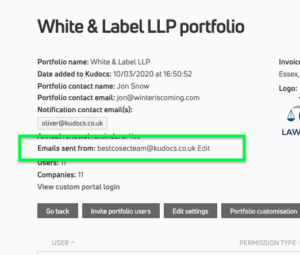
This change is easy to make – just go to Portfolio settings and you can see the current email sender address . As above, the default is notifications@kudocs.co.uk. Click on ‘Edit’ to change this to whatever you want. You can always review and update this address.
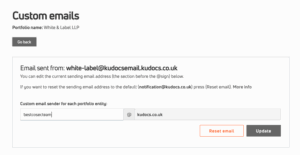
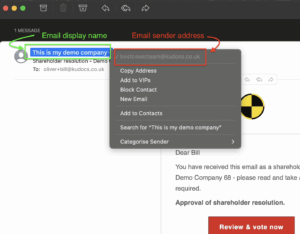
The sender email address is different to the display name i.e. the sender name appearing in the recipient’s inbox. The display name will depend on whether the Kudocs email is sent in relation to an entity (for example, “Kudocs Example Ltd”) or a portfolio. Where relevant, this can be controlled in the settings page of that entity.
In all cases, the email sender address is the same. e.g. the email sender address would be “bestcosecteam@kudocs.co.uk” regardless of the display name that appears in the recipient’s inbox. See below for a screenshot explaining the difference.
What will Kudocs update once a resolution is passed (or rejected)?
Once a resolution vote is passed or rejected, Kudocs will automatically update the process status, move on to the next stage of the process if relevant (e.g. Companies House filings), and generate a signed resolution pdf. Where relevant, a copy resolution for filing at Companies House will also be generated.
If a members’ resolution has not yet reached its expiry date – even if it has been approved or rejected by the relevant majority – stakeholders who have not yet voted still can do so. Their votes will be added to the record and updated on a pdf copy of the resolution as appropriate.
Last updated: 16/06/2026 by Kudocs Admin